
High school volleyball match in a gym, the kind of game families can watch live online

Guide

How to livestream
volleyball games.

One iPhone, one tripod and a free-to-download app. Families watch in a browser with the live score on screen.

The simplest way to livestream a volleyball game is to mount an iPhone or iPad on a tripod and stream with Varsity Score. The app puts the live set score on the stream, saves a full HD recording to your device, and lists the game on varsityscoreapp.com/watch. Viewers need no app and no account.

01

Gather what you need

You need an iPhone or iPad, a tripod with a phone or tablet mount, and the free-to-download Varsity Score app. A charger or battery pack is smart, because streaming and recording together use more power than either alone.

A tripod matters more for streaming than for recording. A shaky stream is hard for remote viewers to watch for a full match, and nobody can hold a device steady for 90 minutes.
02

Place the camera

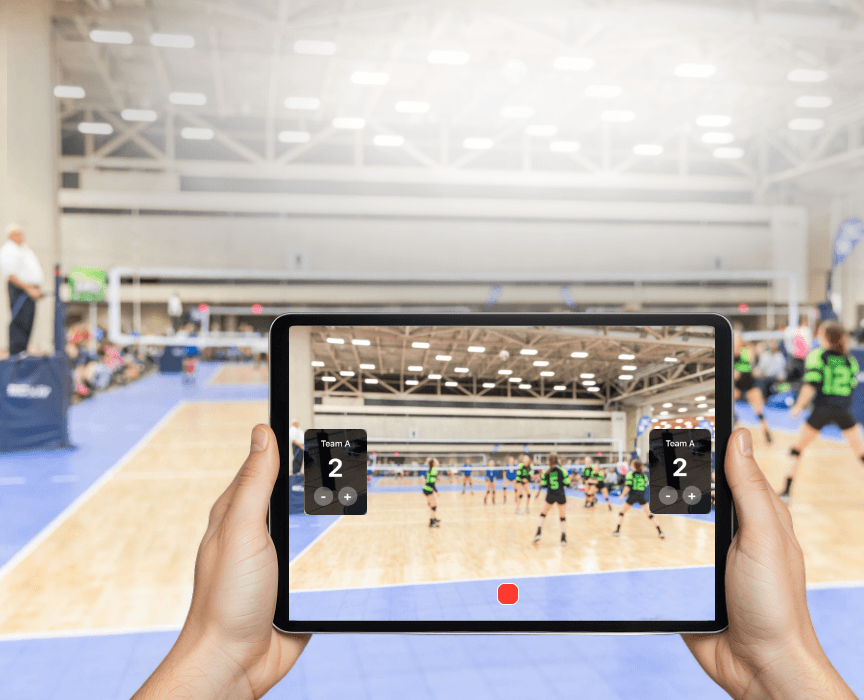
Mount the device at an end-line corner, as high as the gym allows. A bleacher row works well. Frame the whole court with the net and both sidelines visible.

Remote viewers cannot look around the gym, so a wide frame beats a close-up. Check the framing on screen before the warm-up ends, then leave the tripod alone.

03

Check your connection

Streaming needs an internet connection. Recording and scoring do not. Test the connection where the camera will sit, not in the lobby.

Gym Wi-Fi is often weak in the bleachers, and a gym full of phones can slow it down. Cellular data is usually a safer bet when the building network is unreliable. Test both before the match and use whichever shows the stronger signal at the camera position. These are general tips, not app settings.

04

Set up the teams

Open Varsity Score and enter both team names. Add logos and colors if you want them on screen. Short names read best on the overlay.

The team names, set score and set number appear on the stream, so remote viewers see the same score display as people in the gym.

05

Start the stream

Start the stream from the app when the teams are ready. Varsity Score streams with the live score overlay and records a full HD copy to your device at the same time.

The app supports streaming to Twitch, Facebook Live and varsityscoreapp.com simultaneously. Streaming to varsityscoreapp.com is what puts your game on the watch page. If you want to be sure it connected, open the watch page on another device and look for the game.

06

Keep score during the match

Tap once per rally point. The overlay updates on the stream in about one second. Tap New Set between sets and the points reset to 0-0.

If your camera is an iPad on a tripod, pair an iPhone as a remote control and update the score from anywhere on the sideline. The iPad keeps filming with a steady frame.

07

Finish and share the replay

Stop the stream and recording when the match ends. The full recording saves to your Photos app, and the stream replay is kept on the watch page.

Families who missed the live game can rewatch from the same page. You can also share the file from Photos with players or post it elsewhere.

For parents and fans

How families find the game.

Send families to varsityscoreapp.com/watch. Streamed games appear there automatically, and viewers can watch on a phone, tablet, laptop or TV browser.

Two things to know. First, a stream that never connects does not appear on the watch page, so check it from a second device if the game matters. Second, live streams go through Varsity Score servers, and replays are kept so people can rewatch.

Want to record without streaming? Follow the record a volleyball match guide.

Download on the
App Store
Volleyball score overlay with team names and set score shown on a Varsity Score video

Quick checklist before every stream

  • Device charged, or plugged in, with free storage for the recording.
  • Tripod stable and the court fully in frame.
  • Connection tested at the camera position.
  • Team names entered and the score at 0-0.
  • Watch page opened on a second device to confirm the game is listed.

For help choosing hardware, read the best camera setup for volleyball. To compare apps, see the best volleyball app page, or the volleyball overview and features.

Common questions

Straight answers.

What is the easiest way to livestream a volleyball game?
Use an iPhone or iPad on a tripod with the Varsity Score app. It streams the match with the live score overlay while saving a full HD copy on your device, and the game appears automatically at varsityscoreapp.com/watch.
Do viewers need an account or an app?
No. Viewers watch from any browser on a phone, tablet, laptop or TV. They do not need to download an app or sign up.
Can I stream to Twitch or Facebook too?
Yes. Varsity Score supports streaming to Twitch, Facebook Live and varsityscoreapp.com at the same time while it records to your device.
What if my stream does not connect?
A stream that never connects does not appear on the watch page. Check your connection, then restart the stream. Keep recording either way, because the local recording does not depend on the internet.
Can people watch the game after it ends?
Yes. Replays of streamed games are kept so viewers can rewatch them on the watch page.
Is Varsity Score free?
Varsity Score is free to download on the App Store. The App Store listing shows current pricing details.

Go live at the next match.

Free to download for iPhone and iPad (iOS 15.0 or later).

Download on the
App Store