Guide
Video analysis tools for high school volleyball.
Hudl, Balltime, SmashVision, DataVolley and the free options: what each one does, who it fits and what it costs.

Most high school programs do best with two layers: a free way to film every match, and one analysis tool sized to the budget. If your school already pays for Hudl, use it. If you want stats without tagging, AI tools like Balltime or SmashVision work from uploaded video. Film with Varsity Score on an iPhone so every clip shows the set score, and add paid analysis once you know which numbers you will actually use.
What video analysis means for a high school staff
“Video analysis” covers four different jobs, and most tools only do some of them:
- Filming: getting a steady, full-court recording of every match.
- Review: watching back, jumping to key rallies and showing clips to players.
- Tagging: marking serves, passes and attacks so you can filter them later.
- Stats: turning those tags into numbers like pass ratings, hitting percentage and side-out rate.
A high school staff usually has one or two coaches, no analyst and limited time between matches. Pick the tool that covers the jobs you will really do each week, not the one with the longest feature list.
Free and low-cost: start here
Phone, Photos and YouTube
An iPhone or iPad on a tripod records HD video that is good enough for film review. Watch it in Photos, or upload it to YouTube as unlisted and add timestamps in the description so each set becomes a chapter. YouTube needs at least three timestamps, starting at 00:00. You get no tagging or stats, but it costs nothing and players can watch from home.
Varsity Score
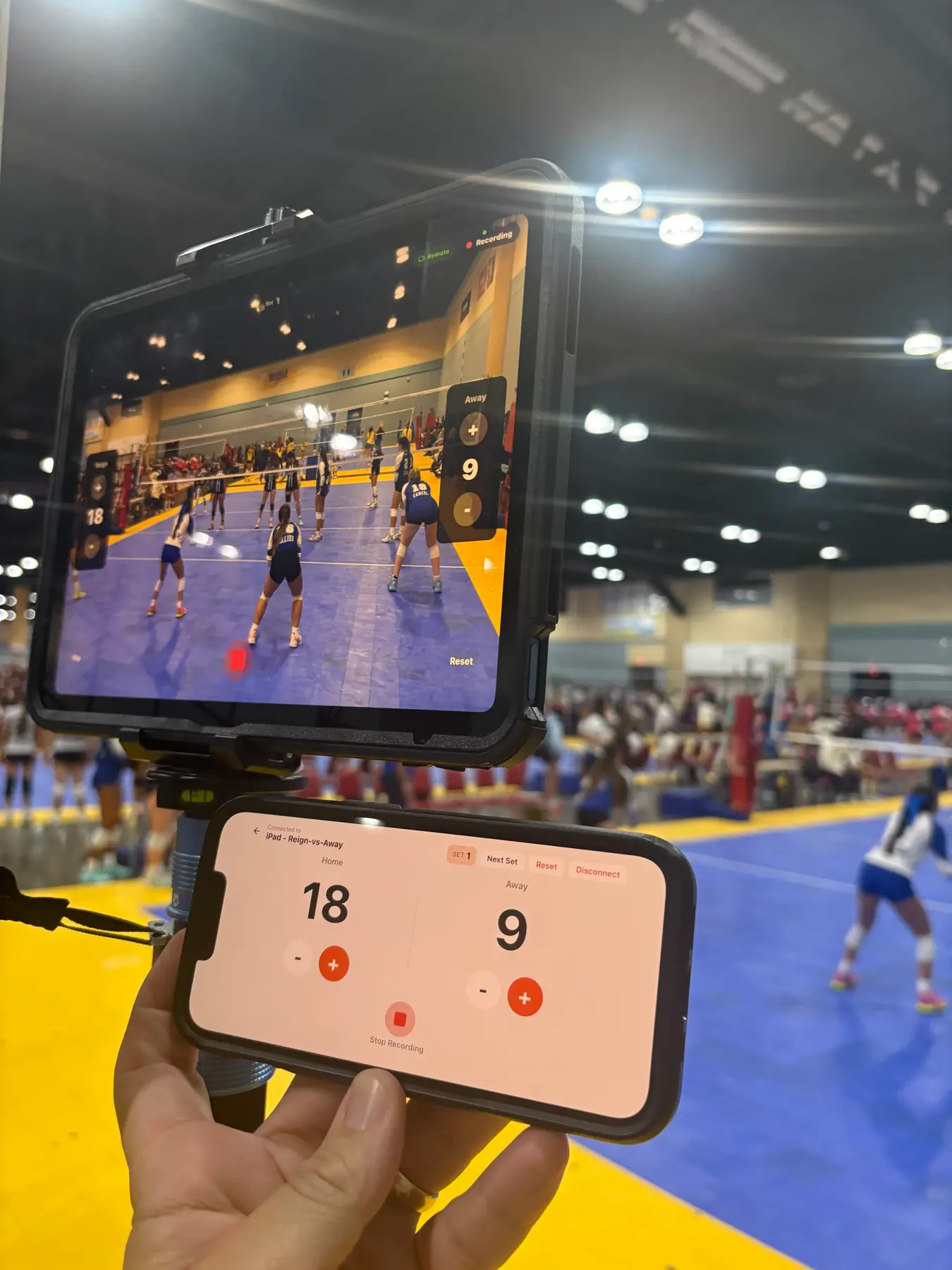
Varsity Score is a free-to-download iPhone and iPad app that records the match with a live, set-based score overlay burned into the video. Team names, set score and set number are on every frame, so nobody asks “what set was this?” during review. An iPhone can act as a remote for an iPad on a tripod, it records offline, and it can stream live so families and absent staff can watch. Score-Only Mode keeps score without video.
It is a recorder and streamer, not an analysis platform. It does not tag plays or produce stats. Think of it as the free filming layer that pairs with whatever analysis tool you choose. See how coaches use it on the coaches page.
AI stats from uploaded video
Balltime (now part of Hudl)
Balltime joined Hudl in February 2025. You upload match video from a phone, tournament or practice, and its AI tags each touch and player, then builds highlights and filters by rotation, set or action. Hudl lists individual plans at $20 per month (Player) and $25 per month or $299 per year (Recruiting). Team plans are “contact us,” and Hudl says Balltime team subscriptions move to Hudl at renewal. More detail in Varsity Score vs Balltime.
SmashVision
SmashVision detects actions, players and rotations from uploaded footage or a live camera feed, and coaches can review and edit every stat. It also offers scouting and practice load tracking. It publishes pay-per-use pricing: a free account, then EUR 20 per uploaded match or EUR 40 per live game, or Pro at EUR 3,000 per season with 150 credits. Pay-per-match pricing can suit a team that only analyzes a few big matches. See Varsity Score vs SmashVision.
Full team film platform: Hudl
Hudl is the default film platform in many high schools, often through an athletic department package. For volleyball it offers a shared film library, drawing and comments on clips, custom tags, playlists and highlight reels, plus Focus cameras that film hands-free and livestream to Hudl TV. Hudl Assist adds match stats tagged by Hudl’s volleyball experts, with reports such as setter and attack tendencies.
Hudl’s high school pricing page lists Silver+ at $1,500, Gold+ at $2,500 and Platinum+ at $4,000 per program per year. Athletic department packages and Assist are priced by quote. Hudl’s AI breakdowns page lists high school volleyball match and practice breakdowns as “coming in 2026” with a waitlist, so check availability for your school. Club teams see different plans, from $500 to $1,600 per team per year, sold in multi-team or club-wide packages. Compare it in Varsity Score vs Hudl.
Coach-coded stats software: DataVolley and VolleyStation
DataVolley 4 is the long-standing volleyball scouting software. A trained coder enters every touch live or from video, and the codes sync to the footage. It runs on Windows, and Data Project lists LITE at EUR 299 per year and Professional at EUR 799 per year. VolleyStation Pro is a newer coding tool with heatmaps, a rotation planner and a bench mode that shows live data on a tablet. It does not publish pricing.
Both are powerful, but the learning curve is real. They fit high school programs that have a dedicated stat person, or coaches who also run a club team that already codes matches.
College and pro: Hudl Volleymetrics
Volleymetrics is Hudl’s analytics service for college and pro teams. Professional analysts code every touch on both sides of the net, with results within 12 hours, and it includes smart cameras and league video exchanges. Hudl does not publish a price; it is quote-only. Most high school staffs will get more value from the options above. If you are researching VolleyMetrics price, read VolleyMetrics price and a free alternative.
Side-by-side comparison
| Tool | What it does | Best fit | Published price |
|---|---|---|---|
| Phone + Photos or YouTube | Film and rewatch; YouTube chapters mark each set | Any program, especially with no budget | Free |
| Varsity Score | Records on iPhone or iPad with the live set score burned in; live streaming | Every program, as the filming layer | Free to download |
| Balltime (Hudl) | AI tags each touch and player in uploaded video; highlights | Individual athletes; teams through Hudl | Player $20/month; Recruiting $25/month or $299/year; teams: contact Hudl |
| SmashVision | AI detects actions in uploaded or live video; editable stats; scouting | Coaches who want stats without tagging | Free account, then EUR 20 per uploaded match or EUR 40 per live game; Pro EUR 3,000 per season |
| Hudl (high school) | Team film library, comments and drawing on clips, playlists, Focus cameras, Assist stats | Schools already on Hudl or an athletic department package | Silver+ $1,500, Gold+ $2,500, Platinum+ $4,000 per program per year; Assist by quote |
| DataVolley 4 | Coach-coded stats synced to video (Windows) | Staffs with a trained stat coder | LITE EUR 299/year; Professional EUR 799/year |
| VolleyStation Pro | Coding software with heatmaps, rotation planner and a tablet bench mode | Advanced club and college staffs | Not published |
| Hudl Volleymetrics | Analysts code every touch; results within 12 hours | College and pro programs | Quote only |
Swipe sideways to see the full table.
Prices checked November 11, 2026 on each vendor’s site: Hudl high school, Hudl club volleyball, Balltime, SmashVision and DataVolley 4. Prices and plans change, so confirm with the vendor before you buy.
A simple film-review workflow for a high school staff
- Set up the same way every match. Tripod behind an end line, as high as the gym allows, whole court in frame. Our best camera setup guide covers the details.
- Record with the score on the video. Use Varsity Score on an iPad and let an assistant or manager tap the score from an iPhone. The file is in Photos when the match ends.
- Watch once within 24 hours. Note the set and score of the five to ten rallies worth showing. The overlay makes them easy to find again.
- Share or upload. Post the match to YouTube as unlisted with set chapters, or upload it to your analysis tool if you use one.
- Keep the team session short. Ten to fifteen minutes, one theme per session, such as serve receive or blocking footwork.
- Track two or three numbers. Pass rating and side-out percentage are a good start, whether you keep them by hand or let a tool do it.
How to choose
- No budget: Varsity Score to film, Photos or YouTube to review.
- School already on Hudl: use Hudl for the library and sharing, and ask about Assist or AI breakdowns.
- Want stats without tagging: try Balltime through Hudl or SmashVision on a few matches first.
- Have a stat coder: DataVolley or VolleyStation.
For a wider look at apps for scoring, recording and streaming, see the best volleyball app roundup.
Common questions
Straight answers.
- What is the best video analysis tool for a high school volleyball team?
- It depends on budget and staff time. If your school already pays for Hudl, start there. If you want stats without tagging, AI tools such as Balltime or SmashVision work from uploaded video. If you have a trained stat coder, DataVolley is the long-standing standard. Every option needs good film first, and a free iPhone app like Varsity Score can handle that part.
- How much does VolleyMetrics cost?
- Hudl does not publish a VolleyMetrics price. Its VolleyMetrics page describes advanced analytics for college and pro teams and points to a demo request and sales contact, so pricing is by quote. Most high school programs look instead at Hudl's high school packages, which list prices from $1,500 per program per year, or at AI tools with published plans.
- Is there a free volleyball film app for coaches?
- Yes. The simplest free setup is an iPhone or iPad on a tripod, with the match saved to Photos or uploaded to YouTube as unlisted. Varsity Score is free to download and records with the live set score burned into the video, so every clip shows the set and score during review. It does not tag plays or produce stats.
- Do AI volleyball stats replace a stat keeper?
- They reduce the work, but plan on review time. SmashVision says coaches can review and edit every stat it detects, and its materials note that automatic detection is not perfect. AI tools also depend on the footage, so a steady, elevated camera behind the end line gives them the best chance. Many staffs spot-check one set before trusting a full report.
- Where should the camera go for volleyball film review?
- Put it behind an end line, as high as the gym allows, with the whole court and net in frame. That angle shows serve receive, setter location and attack lanes clearly. Keep the camera fixed rather than following the ball. Our best camera setup guide covers tripod height, battery and storage for a full match.
- Can I use Varsity Score footage in Hudl or Balltime?
- Varsity Score saves each recording to the iPhone or iPad Photos app as a normal video file, so you can upload it to analysis tools that accept your own footage. Balltime says it takes video from phones with no special setup. The score overlay stays on the video, which helps when you jump between sets during review.

Film every match. Score on screen.
Free to download for iPhone and iPad (iOS 15.0 or later).
iOS 15.0 or later, iPhone & iPad